Voice transcripts
Captured with iOS on-device speech recognition. Raw audio is discarded immediately. Never leaves your device. Enforced in code.
On-device AI breaks any task into the next physical step. No account, no cloud, no server. Your data stays on your phone.
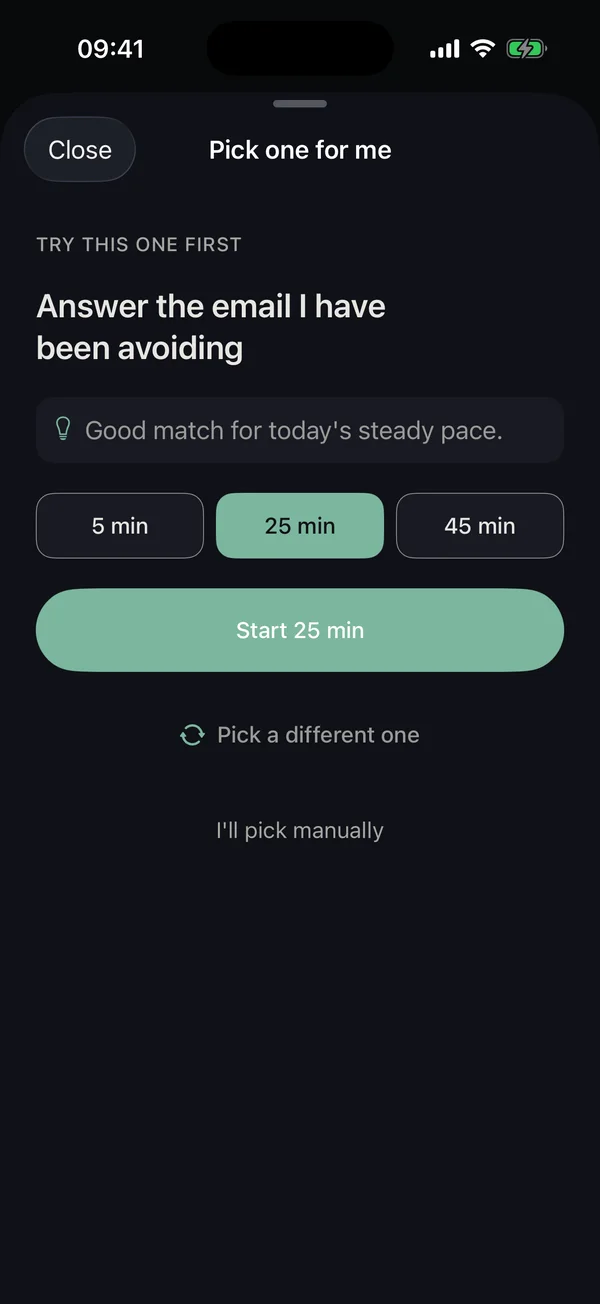
Pick One. One tap chooses the task and starts the clock.

Focus. A visible timer. No red, no streak shame.

Panic Button. One tap breathes with you. Free, no logging.
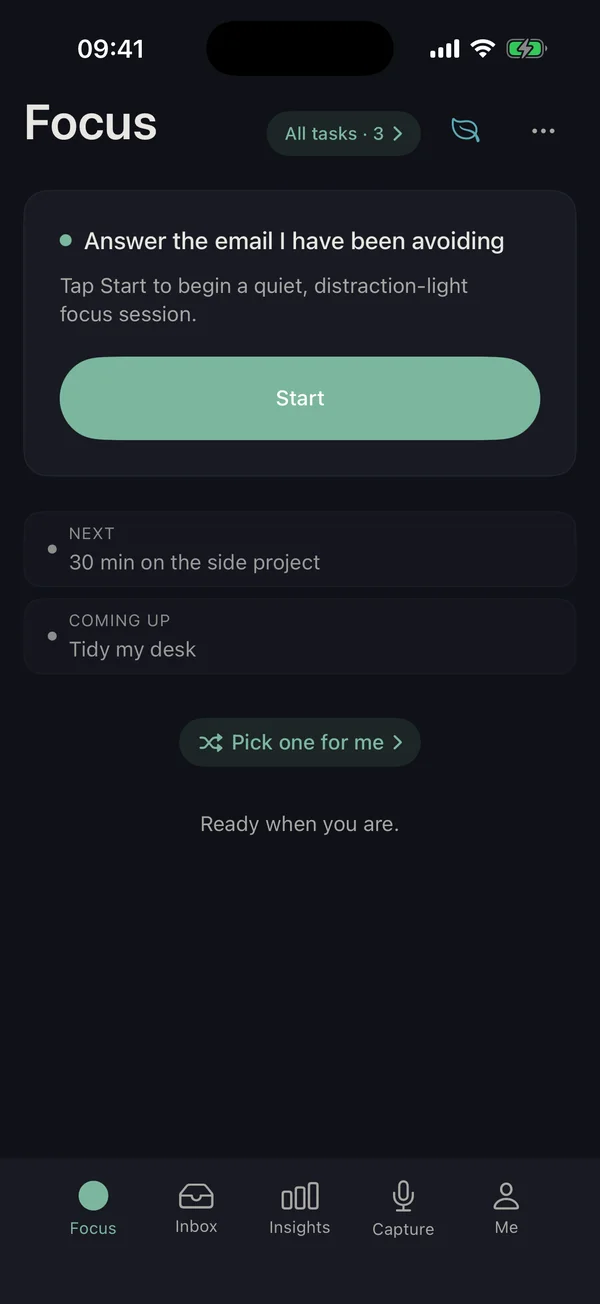
One thing at a time. Your next step, never the whole pile.
Nowhere. KickMint V1.0 keeps your tasks, voice transcripts, AI prompts, AI outputs, cycle phase, sleep notes, completion notes, and medication timing entirely on your iPhone. The on-device AI runs the model file locally with llama.cpp, so the prompt and the response never touch a server. You don't have to wonder where your voice notes ended up. You don't have to read a privacy policy before you say what's actually on your mind. The stuff ADHD makes you ashamed of (the abandoned task you keep snoozing, the cycle phase that wrecks your focus, the medication timing) all stays on your device. We never see it.
Voice transcripts
Captured with iOS on-device speech recognition. Raw audio is discarded immediately. Never leaves your device. Enforced in code.
Cycle, sleep, medication patterns
Written to the local database only. There is no upload path in the app for any of it. Never leaves your device. Enforced in code.
Task titles and AI breakdowns
Prompts and outputs are generated locally by llama.cpp. No network call during inference. Never leaves your device. Enforced in code.
The technical receipts, for anyone who wants them:
Every feature here earns its slot for ADHD and AuDHD adults: Pick One ends the staring contest with your list, on-device AI splits any task into three to five micro-steps, if-then plans wire each step to its own trigger, voice capture banks the thought in five seconds, the Panic Button is one tap away when overwhelm spikes, the Time-Now Anchor strip silences time-blindness without a clock-shaming widget, the Wins capsule shows what you actually finished today, soft landings ease you out of focus instead of cliff-dropping you, Waiting Mode turns the awkward 12 minutes before a meeting into a tiny shipped task, Stealth Mode hides the app contents for the person across the bus, cycle-aware and medication-aware pacing match your real-life biology, and focus soundscapes give the timer a floor of rain or a cafe room tone that plays offline. No streak shame, no public dashboard, no AI upsell for things that should be free.
You stop staring at your list. Tap Pick One, the app reads your tasks and picks the one you can actually start right now, with a 5, 25, or 45 minute timer you can finish. One re-roll if it feels wrong.
"Write quarterly report" becomes "open the doc." The AI splits any task into the smallest first step you can actually do. Three to five micro-steps in a few seconds. Model runs on your phone.
"When the cursor blinks, write the title." Each step has its own trigger so future-you doesn't have to decide. Wieber 2015 meta-analysis put if-then plans at d=0.99, the highest single-mechanic effect in our citation list.
Speak the thought, keep walking. Mic on the home screen widget, the lock screen, and inside the app. Hold it and keep talking: each thought is committed as its own task at the pause, so a brain dump lands as separate items instead of one wall of text. Transcription runs on-device; no audio leaves your phone.
See what your week was, not a guilt scoreboard. Patterns surface when they're useful: when you actually focus, what tasks you finish, what derails you. No red badges. No streak loss. No public leaderboard.
You can have a bad week without losing months of momentum. Take a 7-day pause and the streak holds. The 8 pm nudge is a soft reminder, never a guilt trip. RSD-aware copy throughout.
The task you've been avoiding for three weeks gets a new first step you can actually do today. The AI re-breaks it, sized to the time and energy you have right now, not the time and energy you wish you had.
The day adapts to you, not the 9-to-5 default. One-tap morning check-in tells the app where you are. "I crashed" mode softens the rest of the day instantly. Task order and notification budget shift to when you're actually sharp.
The days everything feels twice as hard get paced differently. Optional: log cycle phase, the app shrinks task sizes and softens nudges across the perimenstrual stretch. Eng et al. 2023 documents the 2x symptom increase. Cycle data never leaves your phone.
You see time passing instead of guessing. The ring shows how much you've already done, not how much is left. 5-minute sprint, 25-minute flow, 45-minute deep, or open-ended. Wennberg ECAP 2018 RCT, d=1.0 large effect on time-processing.
Rain, a cafe room tone, and a handful of other tracks layer under the timer, each with its own volume slider, so you can build the floor your ears want instead of picking from a fixed playlist. Five tracks are free. Everything plays from files on the device, so it works in airplane mode.
Overwhelm spikes happen. One tap on the home screen launches a 4-cycle paced-breathing screen with a round counter and a soft exit back to one tiny step. No alarms, no logging, no upsell. RSD-aware copy throughout.
A quiet strip at the top of Focus shows "now" relative to lunch and end-of-work so time stops disappearing on you. Below it, the Wins capsule names what you actually finished today, three items max, never a guilt scoreboard.
The 12 minutes before a meeting are not lost time. EventKit spots the calendar gap, KickMint suggests a real micro-task that fits, and you ship something instead of doomscrolling. Optional, off by default, calendar stays on your device.
One tap and the app reads as a neutral notebook on the bus. When a focus session ends, Soft Landing offers a 60-second stretch, a sip of water, or a short walk before the next task, picked by session length. You stop face-planting into the next thing.
You guess, the timer measures, the app shows your delta over time. After a few weeks the suggested timer length matches reality, not the time you wished a task took. No grades, no leaderboard.
Tell KickMint when your stimulant or non-stimulant kicks in and tapers. Hard tasks get scheduled in the on-ramp window, low-friction tasks land in the trough. Optional, never shared. Useful for stimulant, non-stimulant, SSRI, and any timed med.
1.3.0 adds hands-free voice capture, focus soundscapes, and Weekly insights, on top of everything 1.2.2 introduced. All of it runs on any supported iPhone with iOS 17.0 or newer. Free to download, Pro features require a subscription or Lifetime purchase.
Hands-free voice capture
Hold the mic and keep talking. Every thought is committed as its own task the moment you pause, so a rambling brain dump lands as separate items you can actually pick from. Transcription is on-device and the audio is discarded immediately.
Focus soundscapes
Layer rain, a cafe room tone, and a few other tracks under the focus timer, each with its own volume. Five tracks are free, the full set is Pro. Everything plays from files on the device, so it works in airplane mode.
Weekly insights
The Me tab shows the last seven days of focus sessions: how many, how long, day by day. It is a record of what you did, not a score to keep up, and there is no streak to break.
Panic Button with paced breathing
One tap from the Focus home screen opens a 4-cycle paced-breathing screen with a round counter. After breathing, a soft exit back to one tiny first step. No logging, no upsell, no alarms.
Time-Now Anchor
A quiet strip at the top of Focus shows where "now" sits relative to lunch and end-of-work. Time stops disappearing on you without a clock-shaming countdown. Works on any iPhone.
Waiting Mode
EventKit detects calendar gaps (12 minutes before a meeting) and surfaces a micro-task that fits. You ship something instead of doomscrolling. Your calendar stays on your device.
Stealth Mode
One tap and the app reads as a neutral notebook on the bus. No one sees your task list, journal, or medication timing. One tap to exit.
Time Estimation Trainer
You guess how long a task takes. The timer measures reality. After a few weeks the suggested session length matches your actual pace, not the optimistic estimate. No grades, no leaderboard.
Medication-aware scheduling
Tell KickMint your stimulant or non-stimulant schedule. Hard tasks get suggested in the on-ramp window, low-friction tasks land in the trough. Never shared, never leaves your device. Useful for stimulant, non-stimulant, SSRI, and any timed medication.
Panic Button: paced breathing, 4 cycles, one tap. Time-Now Anchor: time stops disappearing on you. Voice Capture: keep talking, each thought becomes a task. Stealth Mode: looks like a calendar on the bus.
Because cloud AI for ADHD-adjacent context (cycle phase, sleep patterns, medication timing, voice notes, the tasks you keep snoozing) is a data-leak waiting to happen, and cloud APIs charge per token so personalization gets rationed. KickMint runs the language model on your iPhone with llama.cpp and Qwen 2.5 1.5B Instruct (Apache 2.0 license). Every prompt and every output stays local, the app works offline, the personalization budget is unlimited, and KickMint is not a HIPAA-covered entity because it is not a healthcare provider, plan, or clearinghouse. Privacy is not a vibe. For ADHD adults it is a hard constraint that shapes whether the app is usable at all.
Works on a plane, a subway, a bad hotel wi-fi. Every feature, including AI breakdown, runs without a network round trip.
Cycle, sleep, medication context is local. The app can personalize suggestions based on your patterns without any of that context ever being transmitted.
No API costs means no rate limits. Personalization is continuous, not budgeted. You will not be asked to ration your own suggestions.
KickMint is not a HIPAA-covered entity. We are a consumer wellness app, not a healthcare provider, plan, or clearinghouse. Medical-adjacent context stays on your device regardless.
Open model, auditable stack. Qwen 2.5 1.5B under Apache 2.0, running on llama.cpp. No vendor lock-in, no silent model swaps.
Your tasks are your private notebook. Voice transcripts, AI prompts, medication timing, cycle phase, sleep, completion notes: all stay on the device. Privacy is the product, not a setting.
Free forever for the core app (voice capture, inbox, rule-based task breakdown, basic insights, gentle streak protection, offline use). KickMint Pro is $8.99 per month or $59.99 per year for the on-device AI features (on-device AI task breakdown, AI re-break, breakdowns adapted to your own patterns, full Insights). KickMint Lifetime is a one-time $209.99 if you'd rather not deal with subscriptions. 30 days of full Pro on first tap, no card required, nothing auto-renews. If you subscribe afterwards, cancel the subscription any time in iOS Settings at least 24 hours before renewal. Pro pays for the on-device AI that does the expensive work, not for the features you should already have.
Genuinely useful without any trial clock.
or $59.99 / year, save 44%.
30 days of full Pro, free. No card, no sign-up, nothing auto-renews. When it ends you keep the free tier unless you choose to subscribe. What happens if I subscribe
For people who dislike subscriptions on principle.
Pro and Lifetime are billed via your Apple ID. Cancel a Pro subscription any time in iOS Settings, at least 24 hours before the next renewal. Lifetime is a one-time payment with no renewals. For context, checked 2026-08-30: Tiimo does not publish a price on its site; its FAQ says the amount is shown at checkout (source). Goblin Tools keeps its core tools free and sponsor-funded, and now also offers a paid Goblin Tools Pro tier whose price is shown only after you sign in (source). Inflow is subscription-only, with pricing shown after an intake quiz rather than on a public page (source, checked 2026-07-15). KickMint Pro is $8.99/month and Lifetime $209.99 once, which breaks even against Pro monthly at about 23 months; most ADHD apps offer no one-time option at any price. Open in the App Store →
If KickMint doesn't fit, the App Store handles refunds. No questions from us.
Every load-bearing mechanic links to a study. If-then implementation-intention plans use the Wieber et al. 2015 meta-analysis (28 tests, d=0.99 large effect on goal completion). Visible focus-timer rings use Wennberg et al. 2018 RCT in ECAP (d=1.0 large effect on time-processing in ADHD adults). Working-memory caps of 3 to 5 chunks use Cowan 2001 (replaces Miller's 7±2). The ban on raw red uses Passarotti et al. 2021 ECAP (color triggers amygdala hyperreactivity in ADHD). Task decomposition uses Frontiers in Psychology 2021 RCT. The sage color palette uses Berman, Jonides & Kaplan 2008 Attention Restoration Theory and Xu et al. 2026 on low-saturation backgrounds for working memory. KickMint is not based on vibes. The mechanics that drive the app have published evidence behind them.
If-then plans, d=0.99 across 28 tests
Wieber et al. (2015) meta-analysis of implementation-intention plans found large positive effects on goal completion. KickMint generates an if-then plan per micro-step, not just a checklist.
12-week RCT, d=1.0 large effect
Wennberg et al. (ECAP 2018) found visual timers plus time-skill training significantly improved time-processing in ADHD adults. KickMint uses a shrinking ring, not a digit countdown.
Color and emotional reactivity
Passarotti et al. (ECAP 2021) showed greater emotional reactivity in ADHD. Raw red triggers shame responses that take longer to recover from. KickMint bans Color.red in the design system; warm-coral is the only red-adjacent token permitted.
3 to 5 chunks, not 7±2
Cowan (2001) replaced Miller's 7±2 with the central capacity of 3 to 5 chunks. KickMint's Values question caps selection at 3 from 8 chips, leaving headroom for the ranking decision.
Frontiers Psych 2021 RCT
Task decomposition into smaller steps significantly improves initiation in ADHD adults. Pick One plus AI breakdown together attack the start gate from both sides: the app picks, the app shrinks.
Berman, Jonides & Kaplan (2008)
Attention Restoration Theory supports green for directed-attention recovery. Xu et al. (2026) supports low-saturation backgrounds for working memory. KickMint's sage palette sits in the strongest evidence envelope, not a designer's preference.
These are legitimate questions ADHD adults ask when choosing a productivity app. Here are the factual differences as of 2026-06-13.
On-device vs cloud AI
Goblin Tools' Magic ToDo sends your task text to a cloud LLM API to generate steps. KickMint runs the same kind of breakdown entirely on your iPhone using Qwen 2.5 1.5B via llama.cpp. No text leaves your device. No API key needed. Works on a plane. No per-use cost.
Task picker vs task manager
Todoist is a general-purpose task manager with cloud AI assist. KickMint is built specifically for ADHD executive function deficits: Pick One removes decision paralysis, the AI breaks tasks into a first step you can actually start, and every mechanic has peer-reviewed research behind it. Todoist's AI assist sends task content to OpenAI. KickMint's AI runs on your iPhone.
Structure vs initiation
Tiimo is a visual daily-routine planner for structure through schedules. KickMint focuses on task initiation and in-session execution when the routine breaks down: Pick One, AI micro-steps, Panic Button, time-blindness anchor. The two apps solve different ADHD problems and many people use both.
Comparison is factual as of 2026-06-13. All three apps are legitimate tools for different needs.
These are the questions real users ask. If yours is not here, email [email protected].
Open the app, tap any Pro feature, and you get 30 days with every Pro feature unlocked: on-device AI task breakdown, AI re-break when stuck, sound calibration and the full soundscape library, and the detailed weekly insights. No card, no sign-up, and nothing auto-renews: when the 30 days end you keep the free tier unless you choose to subscribe.
Only if you then subscribe does Apple get involved. The App Store adds its own free intro period first (2 weeks on monthly, 1 month on annual), after which $8.99 per month or $59.99 per year auto-renews via your Apple ID. Cancel any time in iOS Settings, at least 24 hours before the next renewal.
ADHD brains dislike subscriptions. If you want to own KickMint with no monthly friction, Lifetime is a one-time $209.99 payment with no renewals. Same features as Pro, billed once via your Apple ID.
Yes. Every feature works without a network connection, including AI task breakdown. The only time the app uses the network is a one-time ~1GB AI model download on first launch.
No. Tasks, voice transcripts, AI prompts, AI outputs, cycle, sleep, and medication data all stay on your device. There is no account and no server holding your content, so there is nothing for us to read.
Qwen 2.5 1.5B Instruct in GGUF format, quantized to Q4_K_M, served by llama.cpp. The model file is roughly 1GB and Apache 2.0 licensed.
iPhone 14 and newer for full on-device AI features. iPhone 11 through iPhone 13 run the rule-based fallback for task breakdown with all other features available.
A single task breakdown takes a few seconds and under 1% of typical battery. The app caps background inference and batches work with iOS efficiency cores so continuous use stays within normal productivity-app battery draw.
No. Voice capture uses the iOS on-device speech recognizer. The raw audio buffer is discarded as soon as it is transcribed. Only the resulting text is kept, and only on your device.
The app still works. Task capture, voice capture, the inbox, rule-based breakdown, streak protection, and basic insights all run without the AI model. AI breakdown is the feature that requires the model.
Goblin Tools and Todoist AI send your task text to a third-party LLM API. KickMint runs inference entirely on your phone using a model we bundle. That means no API costs, no rate limits, no data leaving your device, and offline functionality.
Pick One is the V1 hero feature. Decision fatigue is the boss fight in ADHD. Tap Pick One, the app picks the right task for now from your list, suggests a session length (5, 25, or 45 minutes), and gets you started. One re-roll is allowed if the pick feels wrong, then the app force-picks so you cannot infinitely defer.
Every load-bearing mechanic is cited. If-then plans use Wieber 2015 meta-analysis (d=0.99). Visible timer ring uses Wennberg ECAP 2018 RCT (d=1.0). Working memory cap of 3 chunks uses Cowan 2001 (replacing Miller's 7±2). No-raw-red rule uses Passarotti ECAP 2021 amygdala hyperreactivity. Task decomposition uses Frontiers Psych 2021 RCT. Sage palette uses Berman, Jonides and Kaplan 2008 Attention Restoration Theory.
Tiimo is a visual daily-routine planner focused on structure through schedules and visual timers. KickMint focuses on task initiation and in-session execution: Pick One removes decision paralysis, on-device AI breaks any task into a first step, and the Panic Button handles overwhelm. KickMint's AI runs entirely on-device with no cloud, and all data stays on your iPhone. The two apps serve different ADHD needs and can be used together.
It comes across with your iPhone backup. KickMint keeps everything in a local database inside the app, and that database is included in Apple's encrypted iPhone backup. Restore a new iPhone from that backup and your tasks, journal, breakdowns, and settings are already there. There is no KickMint account and no KickMint server, so there is nothing to sign into and nothing of yours sitting on our side.
The Panic Button is a one-tap overwhelm rescue on the Focus home screen. Tap it and a 4-cycle paced-breathing screen opens. After breathing, a soft exit returns you to one tiny first step. No logging, no upsell, no alarms. Available in the free tier.
The Time-Now Anchor is a quiet strip at the top of the Focus screen that shows where "now" sits relative to lunch and end-of-work. It addresses time-blindness by giving a relative position without a clock-shaming countdown. It is available in the free tier.
Waiting Mode uses EventKit to detect gaps in your calendar (such as 12 minutes before a meeting) and suggests a real micro-task that fits the time available. Off by default, optional, and your calendar stays on your device. Free, no subscription needed.
KickMint is an iPhone app. It also runs on iPad in iPhone compatibility mode. There is no separate iPad or Mac app, and there is no cross-device sync: your data lives on the iPhone you use it on. Full on-device AI requires iPhone 14 or newer.
On-device AI, panic button, time-blindness anchor, hands-free voice capture, and cycle and medication-aware pacing. Free to download. 30 days of full Pro on first tap; if you stay, $8.99 monthly, $59.99 yearly, or $209.99 one-time Lifetime. Nothing leaves your iPhone unencrypted.

Questions before you download? Email [email protected]. We respond to every message in person.