What Goblin Tools is good at
You have eleven tabs open and Magic ToDo is one of them. Then your kid screams. Then you forget what you were doing. That is Goblin Tools' actual use case: the moment you have a task that feels like a blob, you open the browser, type it in, and it spits back steps you can actually do. For task paralysis in the middle of a chaotic afternoon, it is one of the better free options available.
The Magic ToDo tool is consistently the most praised ADHD feature our research team found across community forums and app reviews. On r/ADHD, the most upvoted takes on AI productivity tools almost always include someone calling it out specifically. "Task paralysis happens because a big task feels like one enormous blob," as one aggregated review puts it. Magic ToDo addresses that directly. The interface is low-friction enough that even on a bad executive-function day, you can get a breakdown in under a minute.
Goblin Tools is also free and works on every device with a browser. Android, Windows, Mac, iPhone: it does not care. That cross-platform reach is real, and we will come back to it under tradeoffs.
What leaves your phone when you use it
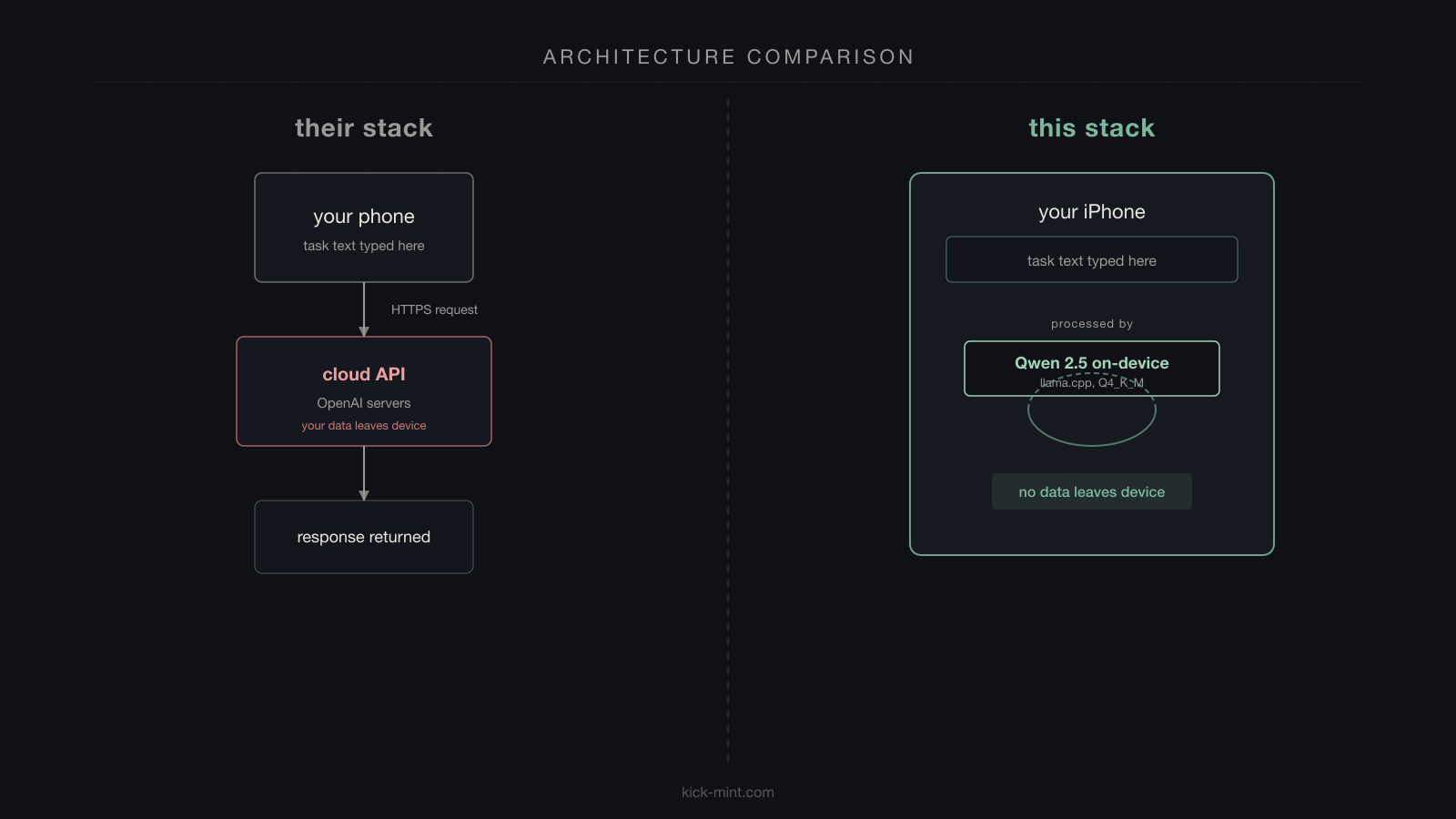
The mechanism behind Magic ToDo is a standard cloud inference pipeline. You type a task, that text travels from your browser to Goblin Tools' servers, which forward it to an external LLM API (OpenAI), which generates the response and sends it back. Nothing unusual about this. It is how most AI features on the web work.
The question is what you are typing into that box.
The tasks that most need breaking down tend to be the ones with the most emotional weight: the medical appointment you have been avoiding for three months, the overdue bill that has been sitting in a stack, the email to your psychiatrist about adjusting your dose, the thing you have been dreading telling someone. Those are exactly the tasks that feel like blobs. And they are also the tasks that, when typed into Magic ToDo, travel through at least two external services before coming back to your screen.
A 2025 survey of ADHD adults (arXiv 2603.17258) found that 77% of respondents rated privacy as "very important" or "mandatory" for any ADHD support tool. That number is not surprising when you think about what ADHD adults are typing into AI tools. Medication notes, sleep context, relationship situations, financial stress: not typical productivity data.
The four architectural differences
Here is what actually changes when the AI runs on your phone instead of a server:
- No data path. KickMint's AI runs on the iPhone's Neural Engine using llama.cpp. When you request a task breakdown, the text goes into a prompt that runs locally. Nothing leaves the device. There is no API call to intercept, no server log to breach, no privacy policy to read carefully.
- Offline by default. After the initial 1 GB model download, every KickMint feature works without a network connection. Goblin Tools requires a live connection for every use. If your data is out, or you are on a plane, or the service is down, it does not work.
- Local health context. KickMint can read cycle phase, medication timing, and sleep data from the iOS keychain and use them to personalize which task it suggests and how it breaks it down. Goblin Tools has no access to this context because it does not persist anything about you between sessions. It starts from zero every time.
- Open model, auditable weights. KickMint uses Qwen 2.5 1.5B Instruct under the Apache 2.0 license. The model weights are publicly available. Goblin Tools calls a closed OpenAI API: you cannot audit what model version is running, what fine-tuning it has received, or what training data it used.
Feature comparison
| Feature | Goblin Tools | KickMint |
|---|---|---|
| AI task breakdown | Cloud LLM (OpenAI API) | On-device Qwen 2.5 1.5B via llama.cpp |
| Data leaves the device | Yes, to external API | No |
| Works offline | No | Yes (after initial 1 GB model download) |
| Platform | Web browser, iOS app | iOS only (iPhone 11+) |
| Task picker for decision paralysis | No | Yes (Pick One, research-backed) |
| Visible focus timer | No | Yes (Wennberg 2018 RCT, d=1.0) |
| Panic Button with paced breathing | No | Yes (free tier) |
| Time-Now Anchor for time blindness | No | Yes (free tier) |
| Medication-aware scheduling | No | Yes (free, on-device) |
| Cycle-aware task ordering | No | Yes (free, on-device) |
| Saves tasks and progress over time | No | Yes |
| Reminders and session tracking | No | Yes |
| Free tier available | Yes | Yes |
| Lifetime purchase option | No | Yes ($209.99) |
| Price (source, checked 2026-08-30) | Core tools free and sponsor-funded; a paid Pro tier exists, price shown only after sign-in | $8.99/mo, $59.99/yr, $209.99 once |
What Goblin Tools users consistently ask for that it does not have
The most common complaint in Goblin Tools reviews is that it does not save anything. You get a breakdown, you close the tab, it is gone. There is no progress tracking, no recurring tasks, no reminders, no way for the tool to learn your patterns over sessions. Every use starts fresh. "None of the tools are deeply personalized. They don't learn your patterns," as one review aggregator summarizes the community take.
The second consistent request is calendar and task manager integration. Magic ToDo breaks a task down into steps, but those steps do not go anywhere. You have to manually copy them into whatever system you actually use. For ADHD adults who already manage too many context switches, that copy step is another point where things get lost.
The third gap is the absence of anything to address what happens before the breakdown and after it. What happens when you cannot decide which task to even put into Magic ToDo? What happens during the session when you get overwhelmed? What helps with the transition between tasks? Goblin Tools solves the breakdown moment and only that moment. For many ADHD adults, the surrounding moments are where things fall apart.
What KickMint adds beyond task breakdown
Pick One is the feature we built first. You tap it, the app reads your adaptive state (time of day, energy level, optional cycle phase and medication window), picks the right task from your list, and suggests a session length: 5 minutes, 25 minutes, or 45 minutes. One re-roll is available if the pick feels completely wrong. Then the app force-picks and does not let you defer further. The force-pick is intentional: infinite re-rolling is its own form of avoidance.
The task breakdown that follows uses if-then implementation intentions. Not just "step 1, step 2, step 3," but: "If you finish writing the first paragraph, then immediately open the reference document." Wieber, Thuermer, and Gollwitzer (2015) ran a meta-analysis of 28 studies on this specific format and found a mean effect size of d=0.99. That is large by Cohen's conventions, and it holds across different goal types and populations. The format works because it pre-loads the next action as an automatic response to a situation cue, rather than requiring an active decision at the transition point. For ADHD adults, the transition is usually where the freeze happens.
The Panic Button is there for when the session goes sideways. One tap from the Focus screen, four cycles of paced breathing (the research on diaphragmatic breathing at approximately 4 breaths per minute shows significant sustained attention improvements in RCT conditions), and then a soft exit back to a single first step. No logging, no upsell, no shame.
The Time-Now Anchor is a quiet strip at the top of the Focus screen showing where "now" sits relative to lunch and end-of-work. Not a clock. Not a countdown. Just a spatial reference for what part of the day you are in, which addresses the time blindness problem without adding urgency.
Where Goblin Tools genuinely has the edge
Goblin Tools is free. KickMint's Pro features cost $8.99 per month, $59.99 per year, or $209.99 once. The free tier covers quite a bit (voice capture, rule-based breakdown, Panic Button, Stealth Mode, Time-Now Anchor), but the on-device AI breakdown is Pro. If you cannot afford a subscription and you are on a budget, Goblin Tools is a real option and KickMint is not.
Goblin Tools works on Android, Windows, and Mac. KickMint is iOS only as of V1.2. If your primary device is not an iPhone, KickMint is simply not available to you. That is a real constraint, not a minor footnote.
Goblin Tools also has the Formalise tool, which rewrites informal text into more professional language. Useful for ADHD adults who need to send a work email without the characteristic way-too-casual phrasing that can come out when you are not filtering. KickMint has nothing equivalent.
If you need cross-platform access, or you need the formalise function, or you cannot justify a paid subscription: Goblin Tools is reasonable, and saying otherwise would be dishonest.
Using both at once
Some people do this already. Goblin Tools on the laptop for brainstorming and formalising, KickMint on the iPhone for actual task execution during the day. They do not directly compete: Goblin Tools is a utility you visit, KickMint is an app you live in. The meaningful distinction is data handling. If you are comfortable with your task text passing through OpenAI's infrastructure, Goblin Tools works fine for the breakdown step. If you are not, everything in KickMint stays on your phone.
Related reading
Frequently asked questions
Does Goblin Tools store my task data?
Goblin Tools processes your task text through a cloud LLM API (OpenAI). Your text travels to external servers to generate the response. The Goblin Tools privacy policy governs what happens to that data. If you type sensitive task descriptions, medication notes, or health context into Magic ToDo, that text leaves your device.
Does KickMint work without Wi-Fi?
Yes. Every KickMint feature including AI task breakdown works without a network connection. The only network use is a one-time roughly 1 GB model download on first launch. After that, the app runs fully offline.
Which AI model does KickMint use?
KickMint runs Qwen 2.5 1.5B Instruct in GGUF format, quantized to Q4_K_M, using llama.cpp on-device. The model is Apache 2.0 licensed. It runs on iPhone 14 and newer for full on-device inference, with a rule-based fallback on iPhone 11 through 13.
Is KickMint free?
KickMint has a free tier with voice capture, rule-based task breakdown, gentle streak protection, Panic Button, Stealth Mode, and Time-Now Anchor. Pro adds on-device AI breakdown, sound calibration, and the full focus soundscape library, of which five tracks are free, at $8.99 per month, $59.99 per year, or $209.99 lifetime. 30 free Pro days unlock every Pro feature, with no card required.
What ADHD-specific features does KickMint have that Goblin Tools does not?
KickMint includes Pick One (a task picker backed by implementation-intention research), a visible focus timer ring (Wennberg 2018 d=1.0 RCT), a Panic Button with paced breathing for overwhelm spikes, a Time-Now Anchor strip for time blindness, medication-aware and cycle-aware scheduling, and Waiting Mode for calendar gaps. Goblin Tools focuses on task decomposition only.
Can I use KickMint and Goblin Tools together?
Yes. Some people use Goblin Tools on a browser for brainstorming and KickMint as their primary task execution app on iPhone. They solve slightly different problems. The meaningful difference is that KickMint never sends your data to a cloud API, while Goblin Tools requires a network connection and processes text remotely.
Why do ADHD users care about privacy in a productivity app?
A survey of ADHD adults (arXiv 2603.17258, 2025) found that 77% rated privacy as "very important" or "mandatory" for any ADHD support tool. The tasks that most need breaking down are also often the most sensitive: overdue bills, medication management, health appointments, relationship situations. When that content goes through a cloud API, it passes through infrastructure controlled by at least two companies.